Can multiple people use Claude Code on the same project?
Ted ·
Short answer: yes. Each person runs Claude Code on their own computer, with their own account, against their own checkout of the shared repo. Git handles the code. What Claude Code doesn't handle is the team part: your sessions, and everything decided in them, stay on your laptop and nobody else can see them.
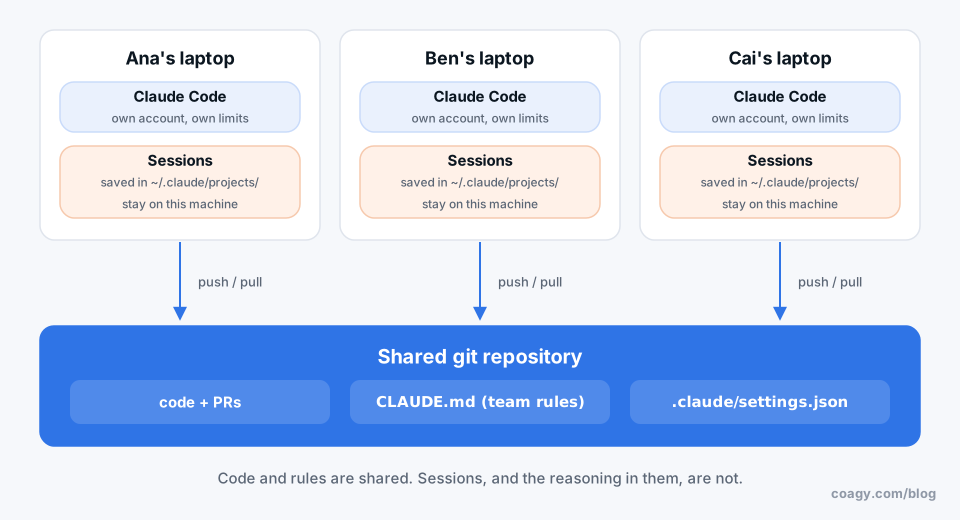
So the real question is how to share everything around the code. Here's a setup that works.
How it works out of the box
Claude Code is a single-player tool. When you run it, it:
- reads the project's
CLAUDE.mdand your personal~/.claude/CLAUDE.md, - works on the files in your local checkout,
- saves the session as a file under
~/.claude/projects/on your machine.
Your teammate does the same on theirs. You meet in git: branches, pull requests, code review. That part is fine. It's how teams worked before AI.
What goes wrong
The gaps show up a few weeks in:
- Context is invisible. "Why did we switch to that library?" The answer is in a session on someone's laptop.
- Work gets duplicated. Two people ask their agents to fix the same flaky test on the same afternoon.
- Agents relearn the same lessons. Your agent figured out that the staging database needs a VPN. Your teammate's agent spends twenty minutes figuring it out again.
- Nobody knows what's running. Is anyone's agent touching the payments code right now? No way to tell.
The setup we'd recommend
1. A committed CLAUDE.md the whole team owns
This is the one shared brain Claude Code has. Put the build and test commands, the folder layout, and the rules ("never run migrations against prod from a session"). When anyone's agent learns something the hard way, it goes in this file. If some of your team uses Codex or Cursor, keep the content in AGENTS.md and make CLAUDE.md point at it.
Keep personal preferences ("I like short answers") in your own ~/.claude/CLAUDE.md so they don't end up in everyone's sessions.
2. Share project settings too
Claude Code reads .claude/settings.json from the repo, which is where you put permission rules (which commands the agent can run without asking) and hooks. Commit it so everyone's agent behaves the same. Personal overrides go in .claude/settings.local.json, which shouldn't be committed.
3. Branch per person, PR per task
Same as any team. The only twist: AI makes big diffs cheap, so keep PRs small on purpose. Ask the agent to put a short "what and why" summary in the PR description.
4. Write decisions where the team can find them
When a session decides something, have the agent write it to docs/ in the same PR. It's the cheapest way to get context off one laptop. We go deeper on this in how to share Claude Code context with your team.
Where Coagy fits
This is what we're building Coagy for, so read this part knowing that.
Coagy is a shared workspace for your team's coding agents. You keep running Claude Code in your own terminal, then turn on session sharing once:
workspace-runner mirror on
After that:
- Teammates see that your session is running, which agent it is, and its status. Not your prompts; sessions are private by default.
- You publish what's worth sharing, and it becomes project memory every teammate's agent can search before it starts on something.
- A teammate can ask your session a question, and you review the answer before it goes back.
- You can start a shared task when you actually want to work on something together, and everyone who joins sees that session.
Each agent still runs on its owner's computer with their own Claude account, so nobody uses a teammate's limits. It's free for up to 4 developers, and people who only watch and chat are always free.
Quick answers
Can two people use Claude Code on the same repository?
Yes. Each person runs Claude Code on their own computer against their own clone of the repository, and you share code through git branches and pull requests like any team.
Does Claude Code have a team mode?
Claude Code sessions are personal: each one runs on one person's machine and is saved there. Teams share a committed CLAUDE.md and .claude/settings.json so everyone's agent follows the same rules. To see each other's sessions, you need a separate tool such as Coagy.
Do teammates need separate Claude subscriptions?
Yes. Each person signs in to Claude Code with their own account or API key. Sharing one login across people isn't how it's meant to be used, and you'd all share one set of usage limits.
How do I share a CLAUDE.md file with my team?
Commit it to the root of the repository. Claude Code reads it at the start of every session for everyone who works in that repo. Personal preferences go in ~/.claude/CLAUDE.md instead.
Try Coagy
Your team's Claude Code, Codex, Gemini CLI and Cursor sessions in one workspace. Free for up to 4 developers.
Start free