Can one team use Claude Code, Codex and Cursor at the same time?
Ted ·
Short answer: yes, and it works fine as long as three things are shared: one instructions file every tool reads (AGENTS.md, with CLAUDE.md and GEMINI.md pointing at it), the same MCP servers and commands set up in each tool, and the same review rules for every PR no matter which agent wrote it. Git doesn't care which agent made the commit.
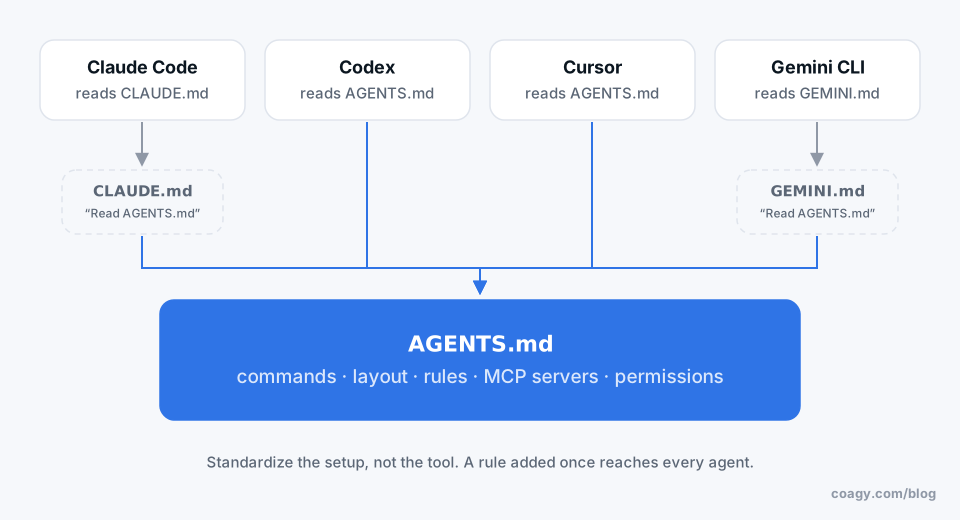
Don't standardize on one tool (unless you have to)
Every few weeks a different coding agent is "the best one". Developers are also faster in the tool they know. Forcing a team onto one tool usually costs more in lost speed than it saves in consistency, and the consistency problems are easy to solve directly.
There are good reasons to standardize: a security review that only covered one vendor, a company-wide contract, or a compliance rule about where code can be sent. If any of those apply, they win. Otherwise, standardize the setup, not the tool.
1. One instructions file, every tool
Each agent reads its own file at startup:
| Tool | Reads |
|---|---|
| Claude Code | CLAUDE.md |
| Codex | AGENTS.md |
| Cursor | AGENTS.md (and .cursor/rules) |
| Gemini CLI | GEMINI.md |
Put the real content in AGENTS.md. Make CLAUDE.md and GEMINI.md one line: "Read and follow AGENTS.md." Now a rule added once reaches every agent on the team. (Gemini CLI can also be configured to read AGENTS.md directly.)
2. Same tools plugged into every agent
If your Claude Code users have a database MCP server and your Codex users don't, their agents will make different decisions. Each tool keeps MCP configuration in its own place (Claude Code in .mcp.json for a project, Cursor in .cursor/mcp.json, Codex and Gemini CLI in their own config files), so write down the list of servers in AGENTS.md and commit the project-level configs you can.
Same for commands: if the build is make test, say so in the file, so no agent invents its own way to run it.
3. Same review bar for every PR
Review the diff, not the tool. A PR from Cursor gets the same tests, the same reviewer and the same checklist as one from Claude Code. Ask every agent to put a short "what and why" in the PR description so reviewers aren't guessing.
4. Watch out for permission differences
The tools differ in what they'll do without asking: running shell commands, editing outside the project folder, using the network. Agree on the team's minimum ("never push, never run migrations, ask before installing packages") and set each tool's permissions to match. Put the rule in AGENTS.md too, as a backstop.
5. One place to see all of it
The hardest part of a mixed team isn't the files. It's that Claude Code sessions, Codex sessions and Cursor chats live in four different apps on four different laptops, so nobody can see what anyone's agent is doing.
That's what Coagy is for (our product, so grain of salt). Each developer keeps their own tool and their own AI account; Coagy shows every teammate's Claude Code, Codex, Gemini CLI and Cursor sessions in one workspace, with their status. Claude Code support is the most tested; the others are newer. Sessions are private by default, and you publish what's worth sharing.
Quick answers
Can Claude Code and Cursor be used on the same project?
Yes. They work on the same git repository like any two editors. Keep shared instructions in AGENTS.md (which Cursor reads) and make CLAUDE.md point to it so both agents follow the same rules.
Does Claude Code read AGENTS.md?
Claude Code reads CLAUDE.md. Teams that use several tools keep the content in AGENTS.md and put a one-line CLAUDE.md that says to read and follow AGENTS.md.
Should my team standardize on one AI coding tool?
Only if security, contracts or compliance require it. Otherwise standardize the setup instead: one instructions file, the same MCP servers and commands, and the same review rules for every pull request.
Which AI coding agent is best for teams?
There's no single answer, and it changes often. The tool matters less than shared instructions, consistent permissions and reviewing every diff. Many teams let each developer pick and share the setup.
Try Coagy
Your team's Claude Code, Codex, Gemini CLI and Cursor sessions in one workspace. Free for up to 4 developers.
Start free