How to hand off an AI coding session to a teammate
Ted ·
Short answer: push the work-in-progress to a branch, have your agent write a handoff note (goal, what's done, what's left, what failed, what to avoid), and your teammate starts a fresh session on that branch with the note as the first message. You can't transfer the session itself: it lives on your computer and runs on your account.
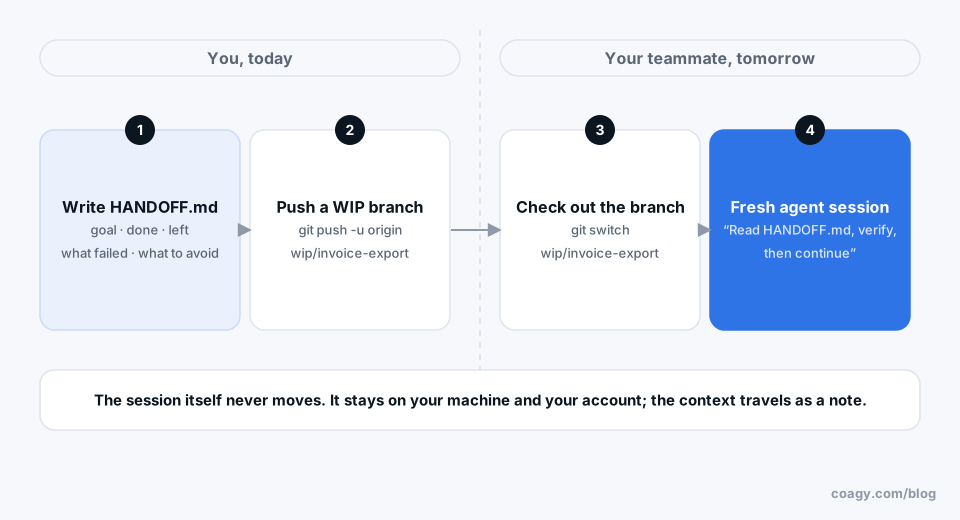
Why you can't just pass the session over
A Claude Code or Codex session is a conversation saved on your machine (Claude Code keeps them under ~/.claude/projects/). It refers to your file paths, it ran under your account, and half of what made it useful is in your head: which approaches you already rejected, which test is flaky, what the PM actually meant.
So the goal isn't to move the session. It's to move the context, in a form someone else's agent can read.
Step 1: get the code somewhere they can reach
Commit what you have, even if it's broken, and push it to its own branch:
git switch -c wip/invoice-export
git commit -am "WIP: invoice export, CSV done, PDF not started"
git push -u origin wip/invoice-export
Say "WIP" in the commit so nobody merges it by accident. If the tests are failing, say which ones in the message.
Step 2: have your agent write the handoff note
Your agent has the whole conversation in context, so it's the best author. Ask for something specific:
Write HANDOFF.md for a teammate's agent picking this up tomorrow:
- the goal, in one sentence
- what's done and how you verified it
- what's left, in order
- what we tried that didn't work, and why
- anything to avoid (files, commands, shortcuts)
- the exact commands to run the relevant tests
Read it before you send it. The "what didn't work" section is the most valuable part, because it's the part a fresh agent would otherwise rediscover the slow way.
Commit it to the branch, or paste it into the PR description if you don't want it in the repo.
Step 3: your teammate starts fresh
On their machine:
git fetch && git switch wip/invoice-export
Then they start a new session and make the note the first message: "Read HANDOFF.md, check the current state with the test commands in it, then continue with the first item under what's left." Asking it to verify first matters: the note describes what was true, and the agent should confirm it before building on it.
Step 4: stay reachable for one question
Most handoffs need exactly one follow-up ("why did you pick the streaming parser?"). If you can answer one message tomorrow, say so.
Making handoffs routine with Coagy
We build Coagy for team agent work, so here's how it does this; weigh it knowing that.
If your sessions are shared to a Coagy workspace, any session can produce a private handoff copy: a brief assembled from what was actually recorded (the latest request, the latest result, earlier failed attempts and their errors, saved decisions, the branch, and the files that changed) with a blank "next action" for you to fill in. It's a copy you paste into your own agent session; making it doesn't publish anything to the workspace, and it reminds the next agent to recheck the files rather than trust the brief.
And for that one follow-up question, a teammate can ask your session directly. You see the draft answer and decide whether it goes back.
Quick answers
Can I transfer a Claude Code session to another person?
No. Sessions are saved on your own computer and tied to your account and file paths. Instead, push your work to a branch and give your teammate a handoff note their own agent can start from.
What should a handoff note for an AI agent include?
The goal, what's done and how it was verified, what's left in order, what was tried and failed, anything to avoid, and the exact commands to run the relevant tests.
How does a teammate continue my AI coding work?
They check out your work-in-progress branch, start a new agent session, and give it the handoff note as the first message, asking it to verify the current state before continuing.
How do I share a Claude Code conversation?
Run /export in Claude Code to save the conversation as text you can share. For an ongoing team view of sessions, tools like Coagy mirror sessions into a shared workspace.
Try Coagy
Your team's Claude Code, Codex, Gemini CLI and Cursor sessions in one workspace. Free for up to 4 developers.
Start free