How do I make Claude Code remember things between sessions?
Ted ·
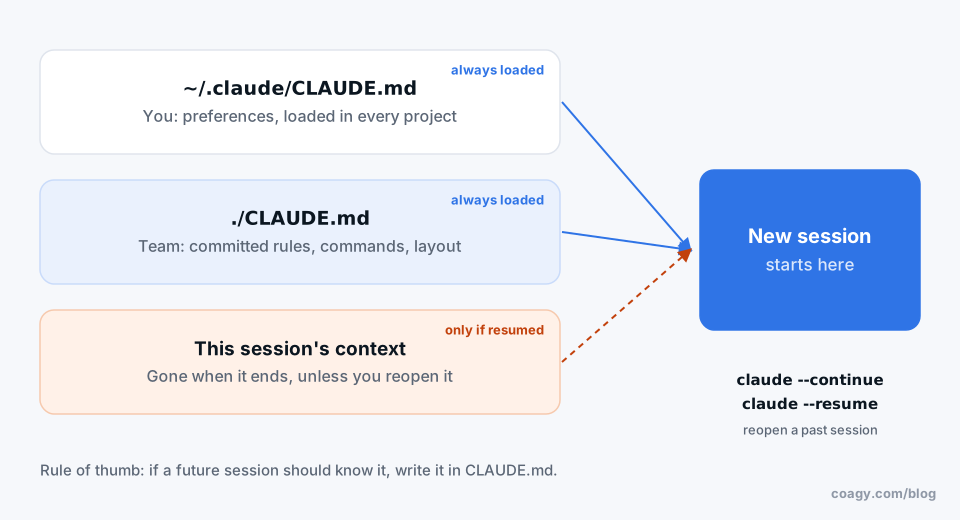
Short answer: put it in CLAUDE.md. Claude Code doesn't remember past conversations on its own, but it reads CLAUDE.md at the start of every session, so anything written there is "remembered" every time. To pick up a specific conversation where you left off, use claude --continue (your last session) or claude --resume (choose from a list).
Why it forgets
Every session starts with an empty context window. Whatever you explained yesterday ("we use pnpm, not npm", "the API tests need Docker running") is gone unless it's written somewhere Claude Code reads on startup. That's not a bug; it's what keeps one session's confusion from leaking into the next. But it means memory is your job.
The three places memory lives
1. The project's CLAUDE.md (shared with your team)
A Markdown file at the root of your repo. Claude Code loads it into every session in that project. Put things here that are true for everyone:
- how to build, test and lint (
npm run test -w api) - where things live ("migrations are in
db/migrations, never edit old ones") - rules ("ask before running anything against staging")
Run /init in a new project and Claude Code drafts one by reading your codebase. Commit it, and every teammate's sessions get the same memory.
A CLAUDE.md can pull in other files with @path/to/file, which is handy for pointing at an existing docs/architecture.md instead of copying it.
2. Your personal ~/.claude/CLAUDE.md (just you)
Same idea, but in your home folder, loaded into every session in every project. Good for preferences: "keep answers short", "I'm on macOS", "never commit for me". Keep team rules out of it, or your agent will behave differently from everyone else's.
You can open and edit either file from inside a session with /memory.
3. The session itself
Within a session, Claude Code remembers everything in the conversation, up to the context limit. When the conversation gets long, /compact summarizes it to free up room. When the session ends, that context is saved to a file under ~/.claude/projects/ on your machine, which is what --continue and --resume reopen.
Recent versions of Claude Code can also keep their own notes per project (auto memory) in that same folder. Those are useful, but they live on your machine only; your teammates' agents never see them.
A habit that makes memory work
At the end of any session where you or the agent figured something out the hard way, say:
Add anything from this session that a future session should know
to CLAUDE.md. Keep it short. Show me the diff first.
Review it like code. A CLAUDE.md that grows by one good line a week becomes the best onboarding doc your project has, for people and agents.
Two things to avoid:
- Don't let it bloat. Every line is loaded into every session and costs context. Prune what's out of date.
- Don't put secrets in it. It's committed and read by every tool that touches the repo.
What about Codex, Cursor and Gemini CLI?
Same pattern, different file name. Codex and Cursor read AGENTS.md; Gemini CLI reads GEMINI.md. Teams that mix tools keep the content in AGENTS.md and make CLAUDE.md a line that says "read AGENTS.md". Codex can also reopen past sessions with codex resume.
When the memory needs to be the team's
CLAUDE.md is great for rules. It's bad for "what we decided last week and why", because that changes too often to keep editing one file.
That's the gap Coagy fills (we build it, so weigh this accordingly). When a session figures out something worth keeping, you publish it to the team's project memory. Every teammate's agent can search that memory before starting on related work, so the lesson your agent learned on Monday is something theirs already knows on Tuesday. Nothing is shared until you publish it, and private sessions stay private.
Quick answers
Does Claude Code remember previous conversations?
Not automatically. Each session starts fresh, except for what's in CLAUDE.md files, which are loaded every time. You can reopen a past conversation with claude --continue (most recent) or claude --resume (pick from a list).
Where is Claude Code's memory stored?
Project memory is the CLAUDE.md file in your repository. Personal memory is ~/.claude/CLAUDE.md. Past sessions are saved as files under ~/.claude/projects/ on your computer.
How do I edit Claude Code's memory?
Edit CLAUDE.md directly, or run /memory inside a session to open the memory files. You can also ask Claude Code to add something to CLAUDE.md and review the change.
How do I resume a Claude Code session?
Run claude --continue to reopen your most recent session in the current folder, or claude --resume to choose one from a list.
Can my teammates' Claude Code sessions share memory?
Only through files you commit, like CLAUDE.md. Sessions and auto memory stay on each person's computer. A shared workspace like Coagy lets teammates publish what they learn so every agent on the team can search it.
Try Coagy
Your team's Claude Code, Codex, Gemini CLI and Cursor sessions in one workspace. Free for up to 4 developers.
Start free