How to run multiple AI coding agents at once without them breaking each other's work
Ted ·
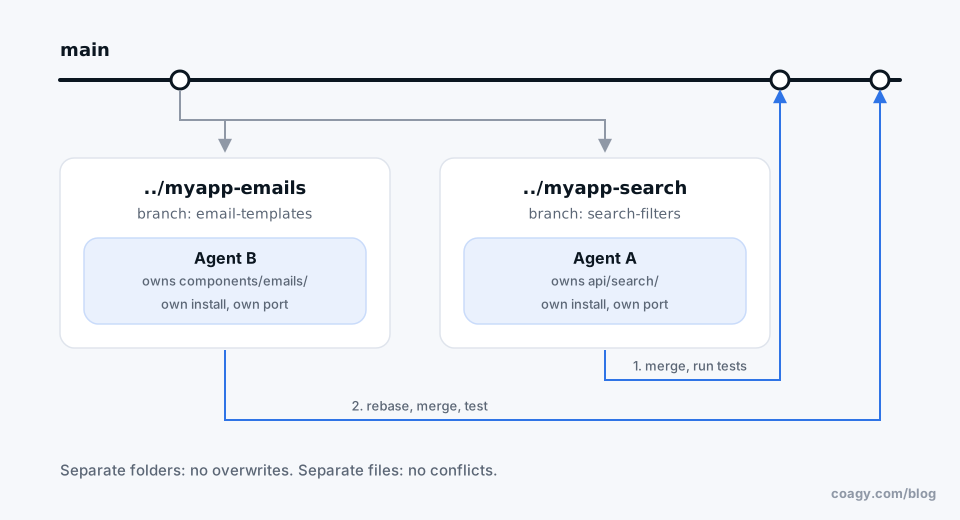
Short answer: give each agent its own git worktree (a separate folder on its own branch), split the work so no two agents own the same files, and merge one branch at a time with tests in between. Two agents in the same folder on the same branch will eventually overwrite each other.
Why agents collide
When two sessions run in the same checkout, they share one set of files on disk. Agent A reads billing.ts, plans a change, and writes it. Meanwhile agent B already rewrote half of billing.ts. A's write wins, B's work is gone, and neither agent knows.
It doesn't matter whether both are Claude Code, or one is Codex and one is Cursor. Same files, same problem.
Step 1: one worktree per agent
Git worktrees let you check out several branches of the same repo into different folders at once, sharing one .git. No re-cloning.
git worktree add ../myapp-search -b search-filters
git worktree add ../myapp-emails -b email-templates
Now open one agent in ../myapp-search and another in ../myapp-emails. They can't touch each other's files, because they're literally different files. When you're done:
git worktree remove ../myapp-search
Two things that trip people up:
- Each worktree needs its own install.
node_modules, virtualenvs and build output aren't shared. Run your install step in each one. - Local servers fight over ports. If both agents start a dev server on port 3000, one fails. Tell each agent which port to use.
Step 2: split by files, not by features
Worktrees stop agents from overwriting each other on disk. They don't stop merge conflicts later. For that, split the work so each agent owns different files.
"Agent 1 adds search filters, agent 2 adds sorting" sounds independent, but both probably edit the same list component. Better: "agent 1 owns api/search, agent 2 owns components/emails." If two tasks have to touch the same file, run them one after another instead.
Put the boundary in the prompt:
Only edit files under api/search/. If you think something outside
that folder needs to change, stop and tell me instead.
Step 3: merge one at a time
When the agents finish, merge one branch, run the tests, then rebase the next branch on top and run the tests again. Don't merge everything at once and hope. If there's a conflict, the agent that wrote the second branch is a fine tool for resolving it, since it knows what it meant to do.
Step 4: don't run more than you can review
Every parallel session ends in a diff you have to read. Three sessions finishing at once is three reviews. For most people two or three parallel agents is the sweet spot; beyond that you're the bottleneck, and sessions sit waiting for you.
When it's a team, not just you
Everything above works when one person runs all the agents. It gets harder when four people each run a few, because now "don't let two agents own the same files" requires knowing what everyone else's agent is doing.
The low-tech fix: post a line in your team channel before a big change ("my agent is refactoring api/billing, stay out for an hour").
This is also what we built Coagy for, so weigh that accordingly. Every teammate's sessions show up in one workspace, so you can see who's working on what before you start. Agents can check too: Coagy gives each agent a who_is_working_on tool that searches the team's task cards and published results, so an agent can find out someone else is already on billing before it starts editing. It only sees what's been shared, never your teammates' private conversations.
Checklist
- One worktree, one branch, one agent.
- Install dependencies in each worktree; give each its own port.
- Split by files. Say the boundary in the prompt.
- Merge one branch at a time, tests in between.
- Run only as many agents as you can review.
Quick answers
Can I run two Claude Code sessions at the same time?
Yes. Open Claude Code in two terminals. If they're working in the same repository, put each one in its own git worktree so they edit separate copies of the files and don't overwrite each other.
What is a git worktree?
A second working folder for the same repository, checked out to a different branch. You create one with git worktree add <folder> -b <branch>. It shares the repository's history, so there's no need to clone again.
How do I stop AI agents from editing the same files?
Give each agent its own worktree, and assign each one a set of files or folders it owns. Say that boundary in the prompt and tell the agent to stop and ask if it needs to change anything outside it.
How many parallel AI coding agents is too many?
When finished sessions start waiting for you to review them. For most developers that happens past two or three at once.
Try Coagy
Your team's Claude Code, Codex, Gemini CLI and Cursor sessions in one workspace. Free for up to 4 developers.
Start free