How to manage your AI coding workflow when you run more than one agent
Ted ·
Short answer: give every agent session exactly one task, keep your project rules in one instructions file every tool reads, make the agent write a plan before it edits anything, and review every diff before it's merged. Most "my AI workflow is a mess" problems come from skipping one of those four.
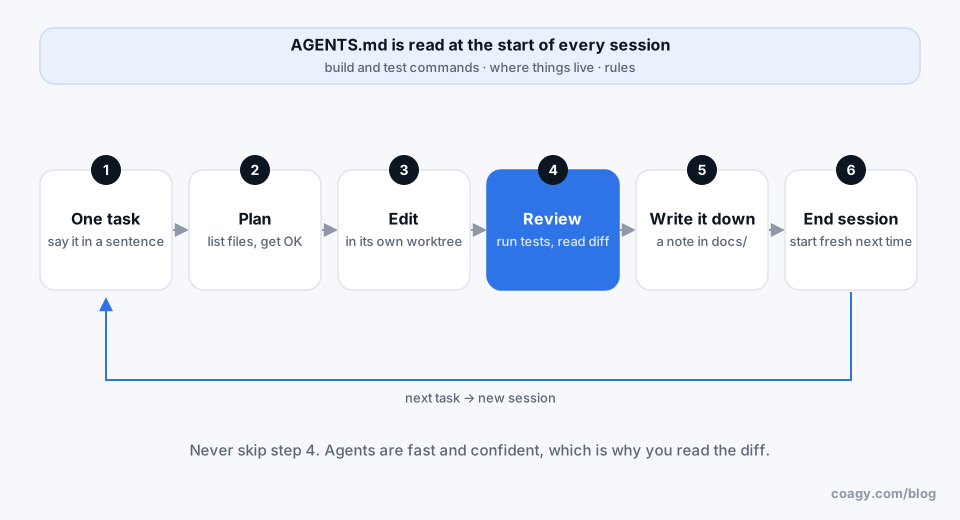
That's the whole thing. The rest of this post is how to actually do it without it turning into busywork.
Why it gets messy
With one agent, your workflow is a conversation. You ask, it does, you check. Your head is the project manager.
Once you're running two or three sessions at once (a refactor in Claude Code, a bug fix in Codex, someone on your team in Cursor) your head stops being enough. The usual symptoms:
- You forget which session was doing what.
- Two sessions touch the same file and one quietly undoes the other.
- A session runs for 40 minutes on the wrong idea because nobody looked at it.
- You can't remember why something was done, because the reasoning was in a session you've since closed.
1. One task per session
The single biggest improvement: a session does one thing, and you can say what it is in a sentence. "Fix the timezone bug in invoices." Not "fix the timezone bug and also clean up the invoice module while you're in there."
When the task's done, end the session. Start a fresh one for the next thing. In Claude Code, /clear resets the conversation, and /compact shrinks it if you really need to keep going. Long, wandering sessions are where agents get confused and where you lose track.
2. One instructions file, every tool reads it
Every coding agent reads a project instructions file when it starts:
- Claude Code:
CLAUDE.md(run/initto generate a first draft) - Codex and Cursor:
AGENTS.md - Gemini CLI:
GEMINI.md
Keep the real content in AGENTS.md and make the others point at it. Put in the commands to build and test, where things live, and the rules you'd otherwise repeat in every prompt ("never edit the generated files in api/types"). Commit it and review changes to it like code.
3. Plan first, then edit
For anything bigger than a one-line fix, ask for a plan before any edits:
Before changing anything, list the files you'll touch and what
you'll change in each. Wait for my OK.
Claude Code has a plan mode for this (Shift+Tab cycles to it). Reading a ten-line plan takes thirty seconds and catches the "it misunderstood the task" problem before it costs you an hour.
4. Never skip the review
Agents are fast and confident, which is exactly why you read the diff. Run the tests, read what changed, and make the agent explain anything you don't understand. A good habit: end each task with "summarize what you changed and why, in three bullets" and paste that into the PR.
5. Keep the parallel work apart
If you're running several sessions on the same repo, give each one its own folder with git worktrees so they can't trample each other:
git worktree add ../myapp-invoices -b fix-invoice-timezones
Each session works in its own checkout on its own branch, and you merge like normal. We wrote more about this in how to run multiple AI coding agents at once.
6. Write down decisions, not just code
At the end of a session where something was decided, have the agent write a short note in docs/ about what was decided and what was rejected. The agent has the whole conversation in context, so it takes ten seconds, and it's the difference between "why is it like this?" having an answer or not.
Where Coagy fits
This is the problem we're building Coagy for, so take this part with a grain of salt.
Steps 1 through 6 work fine for one person. They get harder when it's a team, because now you need to know what other people's agents are doing. Coagy shows every teammate's Claude Code, Codex, Gemini CLI and Cursor sessions in one workspace: who's running what, which session is waiting on an approval, and which one finished. Sessions are private by default (teammates see the status, not your prompts), and you publish the parts worth sharing, like that decision note from step 6.
Agents keep running on each person's own computer with their own AI account. Coagy is the room they're in, not the place they run.
The short version
One task per session. One instructions file. Plan before edits. Review every diff. Separate folders for parallel work. Write decisions down. That's a workflow you can keep up for months, which is the only kind worth having.
Quick answers
What's the best way to organize an AI coding workflow?
Give each agent session a single task, keep project rules in one instructions file (AGENTS.md or CLAUDE.md), ask for a plan before edits, and review every diff before merging. Run parallel sessions in separate git worktrees so they don't edit the same files.
How many AI agents should I run at once?
As many as you can actually review. For most people that's two or three at a time. Past that, sessions start waiting on you for approvals and reviews, and the speedup disappears.
Should I use one long AI session or many short ones?
Many short ones. Long sessions drift, fill the context window and get harder to follow. End the session when the task is done and start fresh for the next one.
How do I keep track of what my team's AI agents are doing?
At minimum, post a one-line note in your team channel when an agent starts on something. For more than a few people, a shared workspace like Coagy shows every teammate's Claude Code, Codex, Gemini CLI and Cursor sessions and their status in one place.
Try Coagy
Your team's Claude Code, Codex, Gemini CLI and Cursor sessions in one workspace. Free for up to 4 developers.
Start free